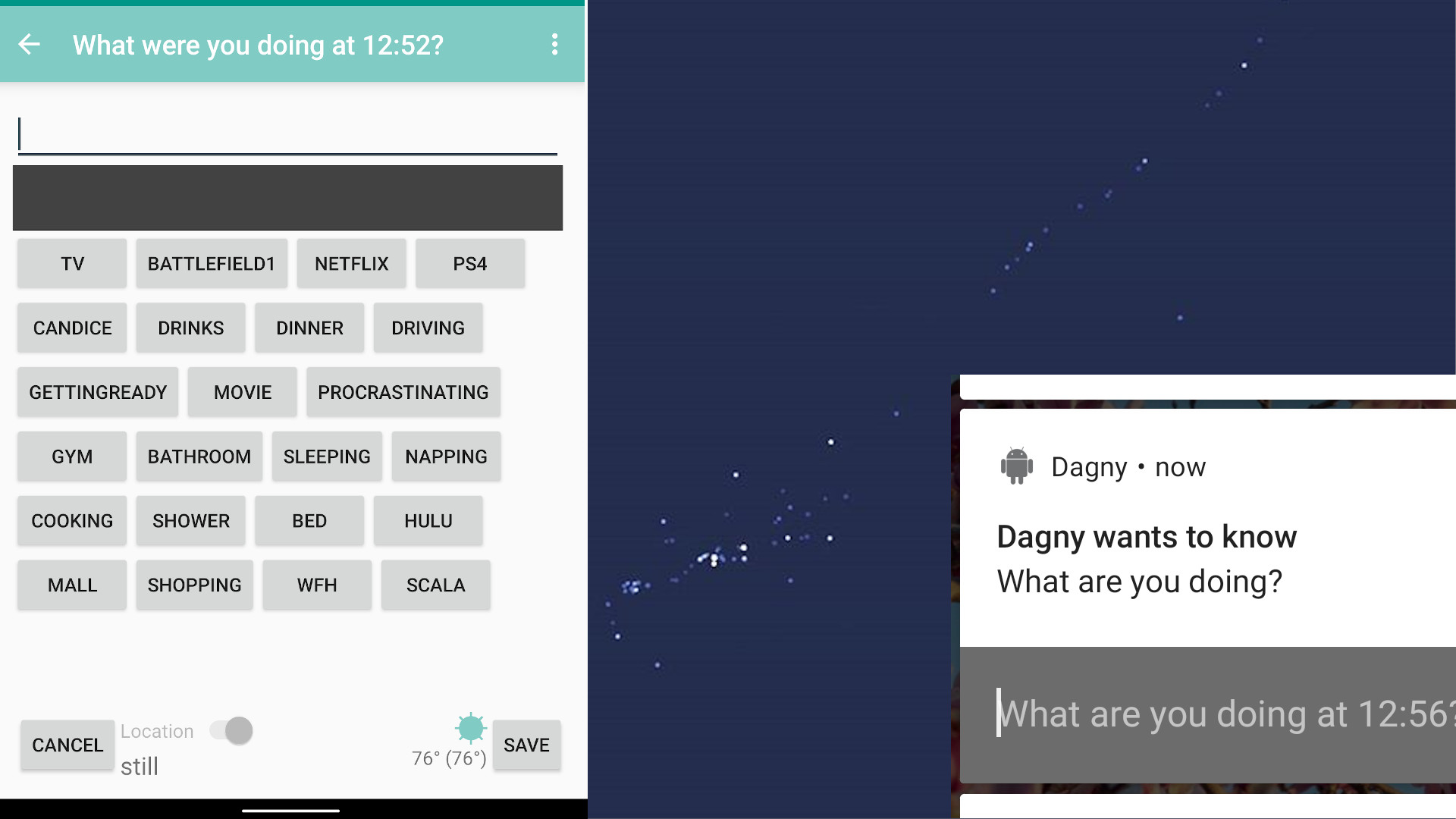
Dagny
This post is much more in depth due to the code base being private.
There are apps for everything related to recording your daily journey. From calendar apps, mindfulness journals, timesheet trackers, to Seinfield Calendars these all exist to log a reminder of your day. It would be great if, in a world where you carry a location aware computer with you all the time, this could happen automatically.
Motivation
This is the idea behind an idea a friend of mine had. Combine these into an unobtrusive app that could periodically ping to ask what you were doing and create a timeline journal of your day. This would grow in a number of ways:
- Habit Building – reminders when you haven’t logged time yet.
- Chain Building – UI for chain lengths and reminders not to break the chain
- Personal Time Budget – Find out how much time you spend doing certain activities
- Time Management – Reminders if you are spending too much (defined by you) on an activity
While the app never grew to that level of interaction, I did build the tracking portion. I used it as an opportunity to experment with some tech, some I was familar with and exploring and some that was new. The app was relatively simplistic: ping the user, they enter a taglist, store on the server. So this was a great chance to play with the style of programming to see if any useful patterns emerged.
Technical Overview
Dagny wants to know.. What are you doing?
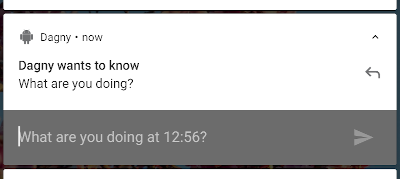
This was the simple prompt that the app would ping you with on average every 30 minutes but with a minimum of 5 minutes. This needed to be least annoying as possible as you’d be doing it about 16 times in just a work day. It started as a comma separated text entry, but grew to include a MRU (most recently used) tag list and then, when the model on the back end was in place, a predictive model selection as well. The nice thing about Android was that these “helper” options were part of the notification so with some minor updates, WearOS nee Android Wear was supported making entry that much easier.
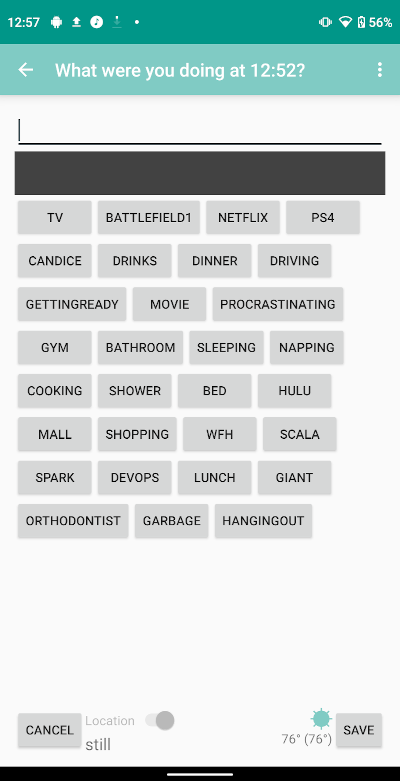
As I got more into the prediction side I wanted more information to make more accurate predictions. At first I added GPS coordinates and Android added something called the Awareness API which would bring in information like the weather, if I was moving was it most like walking, on a bike or in a car, were my headphones in, weird things like that. So I brought that data in. I then started adding WiFi scan data, what APs were around and what was the signal strenght. While it started as more accurate predictions it lead to a data collection device. I wanted add a function to scan bluetooth and store IDs and strengths to analyize and send me notices when I bump into the same things as before. Data collection is addicting!
I had been using Scala for a while and it had many nice features based on monatic design e.g. Option and Future. I wanted to test my understanding and ease my pain by trying to replicate some of these in Java. These worked out very well, especially after using Retrolambda and later Android’s support of Java8’s lambdas.
I had also been seeing lightweight web frameworks using the “middleware” concept of passing a request down through different layers and passing the response back up and out. What would that look like in Java? The style of Scala that I brought in allowed me to chain and react through the functional layers, almost like an primitive RxJava. It turns out, as anyone who used Spring early on before all the tooling took shape, that having a huge stack of the same interface makes finding where a bit of functionality is difficult.
CQRS/ES Server Side
At the time I was working professionally on a project that was being done with Scala and Akka in a CQRS with Event Sourcing (ES). This can be adapted for REST but the important parts are behind the scenes and how they come together to make fast, distributable systems with the possible expense of clarity. So again, to test my understanding I wanted to build a system from scratch for maximum learning potential (and fun). I chose JavaScript and NodeJS running a “next gen” version web framework from the creator of ExpressJS called Koa. The reason for this was support for Promises and how meta-flexable Javascript is (to the dismay of many!).
I wrote the code in two separate modules, a “command” module which would handle validation and writing to storage and a “query” module that would handle all read functions. The simple reason for why you’d want this separation in real life is that reading and writing have different loads and timings. Separating the two allows for better tuning and scaling of only necessary systems. The other pattern I was expermenting with was passing dependencies in via module “constructor”, that is all my module.exports were functions that took as parameters any dependencies of that module. This allowed me to unit and function test outside of a full environment as I could pass in a database object as opposed to my module requireing the actual database library. Maybe this is obvious to Node devs, but for me at the time I thought I really had something good.
My favorite feature on the server side is the way events are stored and replayed to get back to current state. With javascript you can dynamically invoke a method with the syntax of a Map
var thing = {
  callMe: function(a,b) {
    return a + b;
  }
}

console.log(thing["callMe"](1,2)); // => 3
By storing events as JSON documents with an event field and a value field. I could create a model where event types were functions, these could then modify an internal state. This is an idea borrowed from the Actor pattern where internal state is read only and messages need to be passed in to modify state. The flow for any sample update is to get the full list of events, ordered by causal date, and “play them back”. This allowed for a general reduce pattern I called a replayer. The replayer takes a list of events and a set of functions named for the events that were needed. This allowed for a primitive form of stream processing. For any stream of events I could handle all events or just specific ones depending on the need and it would be self documenting since event name matched function name.
var eventList = [
  {event: 'sampleCreated',
    value: {eventId:'xyz', 'userId': 'abc',
            when:0123732743282, tags: ['work','documenting']},
  {event: 'sampleUpdated',
    value: {eventId:'xyz', 'userId': 'abc',
            when:0123732743325, tags: ['work','meeting']},
  {event: 'sampleCreated',
    value: {eventId:'jkl', 'userId': 'abc',
            when:0123732750192, tags: ['commute', 'train']}
  {event: 'sampleDeleted',
    value: {eventId:'jkl', 'userId': 'abc',
            when:0123732750200}}
];

// for 'normal REST' mode, calculate current state of the world
var currentState = function(eventId) {
  var _state = {};
  return {
    'sampleCreated': function(creationEvent) {
      _state = creationEvent;
      return _state;
    },
    'sampleUpdated': function(updateEvent) {
      _state.tags.concat(updateEvent.tags);
      return _state;
    }
    'sampleDeleted': function(deleteEvent) {
      _state = {};
      return _state;
    }
  };
};

// for analytics, count creation events for some reason
var countCreates = {
  var state = 0;
  'sampleCreated': function(creationEvent) {
    _state += 1;
    return _state;
  }
}

// simplified example of _basically_ what's happening.  Theres obiously some "method missing"
// error handling utilities
console.log(eventList.reduce(countCreates)); // => 2
Storage
Storage was handled by Apache CouchDB a REST based document database that supports map/reduce views as javascript functions. You could host an entire application on a CouchDB server if you wanted, these are called “CouchApps” and with the replication feature you could clone that app locally or to another server. I chose it for its REST interface and the map/reduce tools. Since all data was stored as individual events I would need to get the list of events for a particular record and this was done simply with a few lines of javascript. I could even keep my view functions in my code base and sync since view functions are strings in the JSON meta document that describes a db.
When I moved on to trying prediction strategies the first stabs were done purely as map/reduce views with query parameters narrowing the results. Beyond that the views became easy ways to correct data errors like timestamps with missing offsets which earlier data was missing.
Prediction Engine
Prediction was the real driving force for me with this project. I didn’t have a clear idea with what I could do with it, but thinking along the lines of the Google Now/Feed/Whatever they call it this time. This was meant to predict what you were looking for when you accessed it. Boarding status and terminal when on your flight day, transit info if you brought it up near a stop, etc. Eventually I planned on doing a simple google search whatever the predicted tag would be when you opened the app but first I had to predict that tag.
The first attempt was to create some date features, day of week (1-7), minute of day (incorporate both hour and minute thinking similar things were done at similar times, like lunch and commuting), etc. along with location ordered by what I thought was most predictive and sorting the data. This was done purely with a CouchDB view and query syntax. The key was the array of date and time features plus latitude and longitude and the value was a single tag. Arrays of tags had the same key emitted for each tag in the array. A query was then made by taking current time and location and constructing the same feature key +/- some offset on each feature to create a narrow band of results.
| Day of Week | MinuteOfDay | Lat | Long | Week | Month | Tag |
|---|---|---|---|---|---|---|
| 4 | 1321 | -46.736 | 52.1723 | 11 | 1 | work |
| 4 | 1451 | -46.736 | 52.1723 | 11 | 2 | work |
| 4 | 1457 | -46.736 | 52.1723 | 12 | 1 | work |
| 4 | 1739 | -46.182 | 51.2130 | 11 | 3 | thanksgiving |
I don’t have numbers but I believe the error rate on this was no better than randomly guessing. Of the problems with this approach was the weight applied to certain features so more random or wild guesses could not be made. In the example above, looking on a Thursday a time around those above would always be guessed as “work” because day of the week and time of day got sorted far before location which, on a holiday, would show me no where near work.
Future attempts would take me into the world of Scikit-learn and to serve those models I used Flask. The inference delivery was something would not be used in the real world. My method was to train the model using the DB, pickle the scikit learn object to a file, bake it all into docker and on each request open the file and predict using the passed parameters. I was new to python, flask, and scikit. Also the excitement of getting to an accurate prediction pushed me to just get something working and improve later.
I used the tools in Scikit-learn to do model comparison and some limited degree of hyperparameter tuning and landed on using a nearest neighbor. The feature set would be similar to my first attempt but now column order wasn’t important as each one would be compared on its own. By this point I had realized that the scale of the columns was too varied and a change in a location of a city block was a smaller difference than one minute of time, or put another way 1 minute in time was the same as a change in day or week. This model had also added a Scaler to the samples to even that out and not allow one column to outweigh the others. Using this techinque I was able to raise accuracy higher than random guessing but was still only 70-80%. This was exciting enough to push the model out and add code to the app to ping that endpoint and put it’s suggested value in the front of all others if the confidence score was high enough. “High enough” here meaning, tweeked until I could see values show up, way off or not.
In all cases there was no history considered, so part of the inaccuracy came from having so many like data points with differing labels. Another issue was that just randomly pulling any sample would result in ‘sleeping’ for something like 40% of cases. I began looking into sampling for those larger blocks of the same tag to get around that issue.
Deployment
This was an exploration of Docker and Composer. I had a chromebox running Ubuntu server hanging around so I installed docker. CouchDB has images available so all I needed to do was volume mount the data directories to persists between restarts. The node server was easy to build using official Node images by simply adding my source to the right internal location. The prediction server, wrapped up a separate docker image that included the numpy, scikit libraries.This then required having a reverse proxy to route between API calls and prediction calls. For this I used OpenResty a project that adds Lua to NGINX for a more dynamic NGINX. Why this over the vanilla version? At the time I was using this for work to handle JWT authentication and had planned to bring it in here as well to protect data access. But since I was literally the only user, this wasn’t a priority over the more fun stuff.
Mission Accomplished?
While interest in this project dried up, I would occasionally go back and install the app on my phone and record my activities mostly to see the predictions and because data collection is addicting. More! More! More! I had collected over a year’s worth of nearly continous data and from that I tried making some personal reports, dreaming to make something like the Feltron Annual Report, but wow does that take a lot of design knowledge and skill. So in the end I was able to generate some “art” I called my personal constellation from my location frequency but my proudest moment was during one of those reinstall revisits.

The Philadelphia Auto Show is held each year in the Convention Center and ends on the sunday of the Super Bowl. I’m not sure if this is by design, but it has been consistent. I had visited the previous year during normal collection and returned the following year during a reinstall. The date of the Super Bowl moves around but is around the same time every year. I have been to Philly for other reasons and have been in a lower section near the center called Reading Terminal Market but don’t go to into convention center for anything other than the Auto Show.
Imagine my pride when responding to the “What are you doing?” notification to see “auto show” as the top predicted tag with high enough confidence that there was no other options. Not “work”, not the errant “sleeping”, but right on the money. I think that it was all worth it for that one moment.